CronDesk: Custom Automation Software for Business Owners
CronDesk is a custom business dashboard that unifies payments, email, tasks, calendar, and approvals into one automation platform—helping owners save time and make faster decisions.
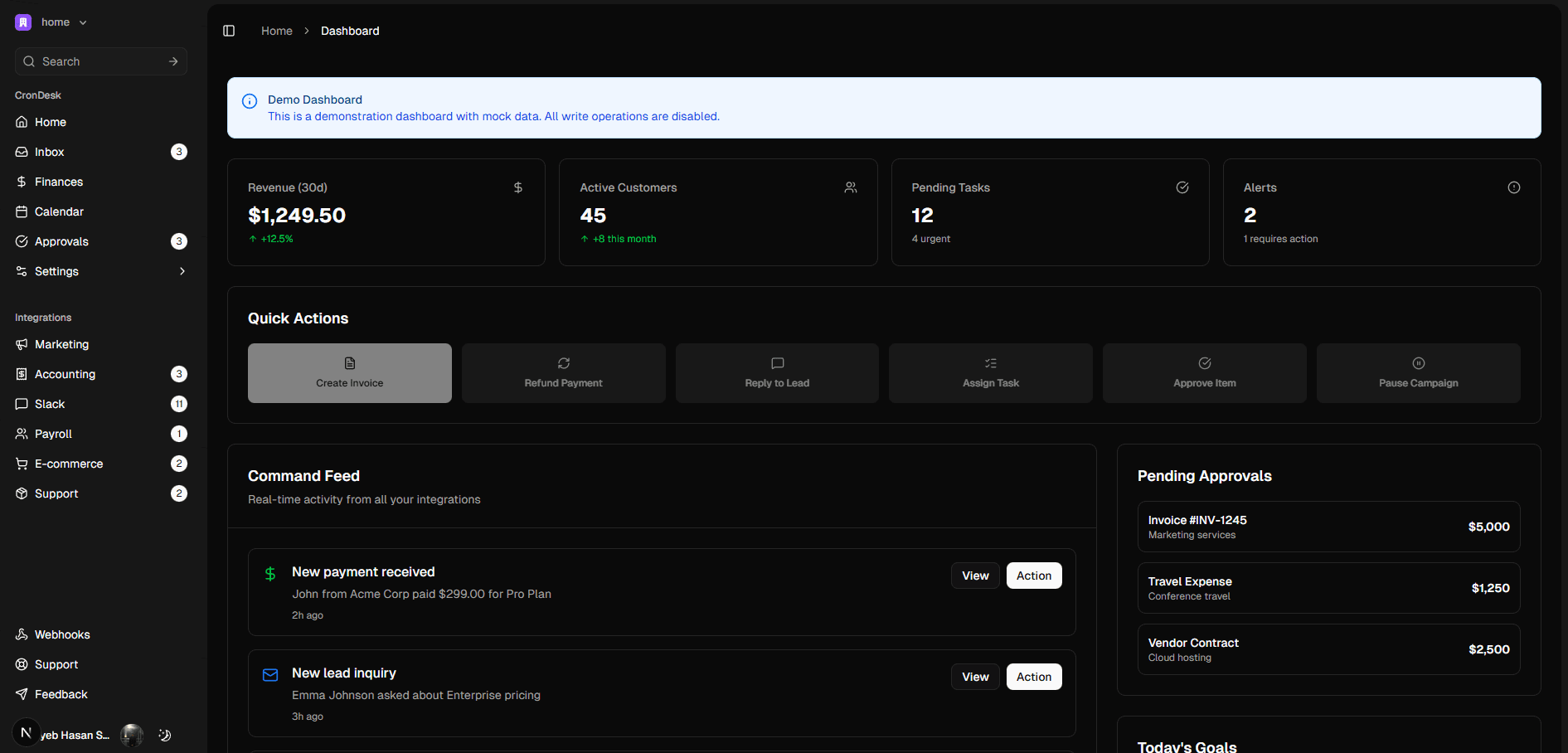
A practical way to stop losing time to tabs and tools
Most small businesses and startups don’t need another single-purpose app — they need fewer moving parts. Between Stripe, Gmail, Asana, Google Calendar, QuickBooks and ad platforms, owners spend half their day switching contexts instead of making decisions. CronDesk was built to solve that problem by bringing those tools together into a single, action-first command center.
This isn’t a vanity dashboard that only shows data. CronDesk is purpose-built as custom automation software for business owners: a place where information and action live together. When a customer requests a refund you can refund from the same view; when an invoice needs approval you approve it without hunting through email threads. That immediate “see it, do it” approach is the core differentiator.
How CronDesk helps real businesses
Think of CronDesk as your operations control room. Typical day-to-day wins look like:
- Processing Stripe refunds and creating invoices while viewing the transaction context.
- Replying to customer emails from a unified inbox with templates to reduce reply time.
- Rescheduling meetings or viewing calendar conflicts directly from the same screen where you approve expenses.
Those small time-savers compound. The result is fewer missed follow-ups, faster approvals, and fewer accounting headaches.
The Command Feed: your single timeline for action
CronDesk’s Command Feed aggregates events from all connected systems into a chronological timeline so nothing slips through the cracks. New payments, overdue invoices, ad budget alerts, task updates — everything appears in one prioritized stream with contextual actions. Instead of opening six apps to complete one task, you finish it from one place. That changes how teams work: less hunting, more doing.
Built to integrate—and to act
CronDesk is made to integrate with the tools businesses already run: Stripe, Gmail, Google Calendar, Asana, HubSpot/Salesforce, QuickBooks/Xero, Google Ads and Meta Ads. Those integrations are not cosmetic — they power one-click workflows and automation rules so routine operations run reliably. If you need a custom workflow or a bespoke integration for a niche process, CronDesk is designed to be extended to fit your operation rather than force you into a one-size-fits-all pattern.
Who benefits most
CronDesk is especially useful for:
- Small business owners who wear many hats and need operational visibility without headcount growth.
- Operations managers who need centralized approval workflows and fewer context switches.
- Finance teams who want a single place to reconcile Stripe activity, invoices, and payouts.
- Marketing teams who must monitor spend across Google and Meta and act quickly when campaigns need adjustment.
- Agencies or multi-client teams that need consolidated control and client-level permissions.
Real outcomes you can expect
When you centralize actions with a command center like CronDesk you should expect measurable improvements: faster decisioning, fewer manual errors, and reduced operational overhead. CronDesk’s product positioning focuses on converting operational friction into repeatable processes, so teams spend time on growth rather than maintenance.
Technology and security — production-ready
CronDesk is built on a modern stack (Next.js, TypeScript, Prisma, PostgreSQL) to deliver reliable performance and developer extensibility. Authentication, audit logging, and observability are production-grade so you can scale integrations and permissions securely as your business grows. That means you can treat CronDesk as both a daily operations tool and a platform to build tailored automations around.
How to evaluate CronDesk for your business
- List the top 5 repetitive operations your team performs today (refunds, invoice approvals, campaign pauses, calendar reschedules, customer replies).
- Match each operation to a CronDesk capability: if it’s supported, estimate the time saved per incident.
- Consider custom integration needs — CronDesk is designed to be extended, so plan for one or two custom automations if your workflow is unique.
- Try the demo to validate the Command Feed and quick actions on your most common events.
Start small, automate fast
The best automation projects begin with one high-friction task. Pick a repetitive operation, connect the relevant tool (for example Stripe + Gmail + QuickBooks), and automate the approval or action flow. Once you see consistent time savings, expand integrations and rules. CronDesk is designed to grow with you, from a single-person founder to a multi-team operation.
If your team spends more time moving between tools than solving customer problems, consolidating around a custom automation platform like CronDesk is one of the fastest ways to reclaim capacity. It reduces noise, centralizes accountability, and gives you a practical platform for safe, repeatable automation.
Try the CronDesk demo to see a working Command Feed and quick-action workflows in your context.
Blueprint, our free scoping tool
Find out what to build next, in about two minutes
Answer a few questions about where your business is today, and Blueprint drafts a recommendation for you: what to build, what to automate, and what a first phase usually costs. It is free, and you can read the result without giving us an email address.